Google Maps Street View
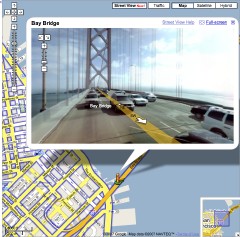 The big news so far from Where 2.0 is the announcement of Google’s street-level imagery for five U.S. cities — Denver, Las Vegas, Miami, New York and (of course) San Francisco — which, in a fit of originality, they’re calling Street View: Google Earth Blog, Google Lat Long, O’Reilly Radar.
It doesn’t normally appear in my browser window, but adding &gl=us at the end of the URL string, as Frank’s commenters suggest, does the trick. I wonder what’s up with that, and why that hack works. Anyway, if it doesn’t show up normally when viewing one of the five cities, try that. (Update 5/30: It’s working for me now without the hack.)
This is not the first instance of street-level imagery to come to an online mapping service, to be sure (see earlier efforts by A9 and Microsoft), but Google’s implementation is well-integrated into the rest of its maps — roads with street-level imagery are outlined in blue — and the user-interface, as you might expect by now, is really good.
There’s also this very strange video tutorial:

Comments
blog comments powered by Disqus